Monday, August 12, 2019

New Journal and Journal Kit: Masculine Vintage Themes

You don't see many masculine-themed journals or digital journal kits. I decided it was time to make some myself. This journal uses my Vintage Masculine Journal Kit (found HERE).


There are ten background spreads in the kit. Each is shown two ways: with and
without added grunge. 


These two spreads feature baseball and US Military. Note that the Times Square kissing photo in the military background page is NOT the original one by Eisenstaedt. Unlike the Eisenstaedt photograph, which is protected by copyright, this Navy photograph is in the public domain as it was produced by a federal government employee on official duty.


The journal is passport-sized (3-1/2 X 5 inches, by 1-1/4 inches tall). It has a hard cover that was made by using the Eileen Hull passport die.  If you are new to the Eileen Hull Passport Die, you can find it HERE.  NOTE: As an Amazon Associate, I earn from qualifying purchase.


I use 2mm elastic cording to hold three individual signatures in the journal, and use the same cording as a closure for the journal. You can see my photo tutorial for threading the elastic HERE.


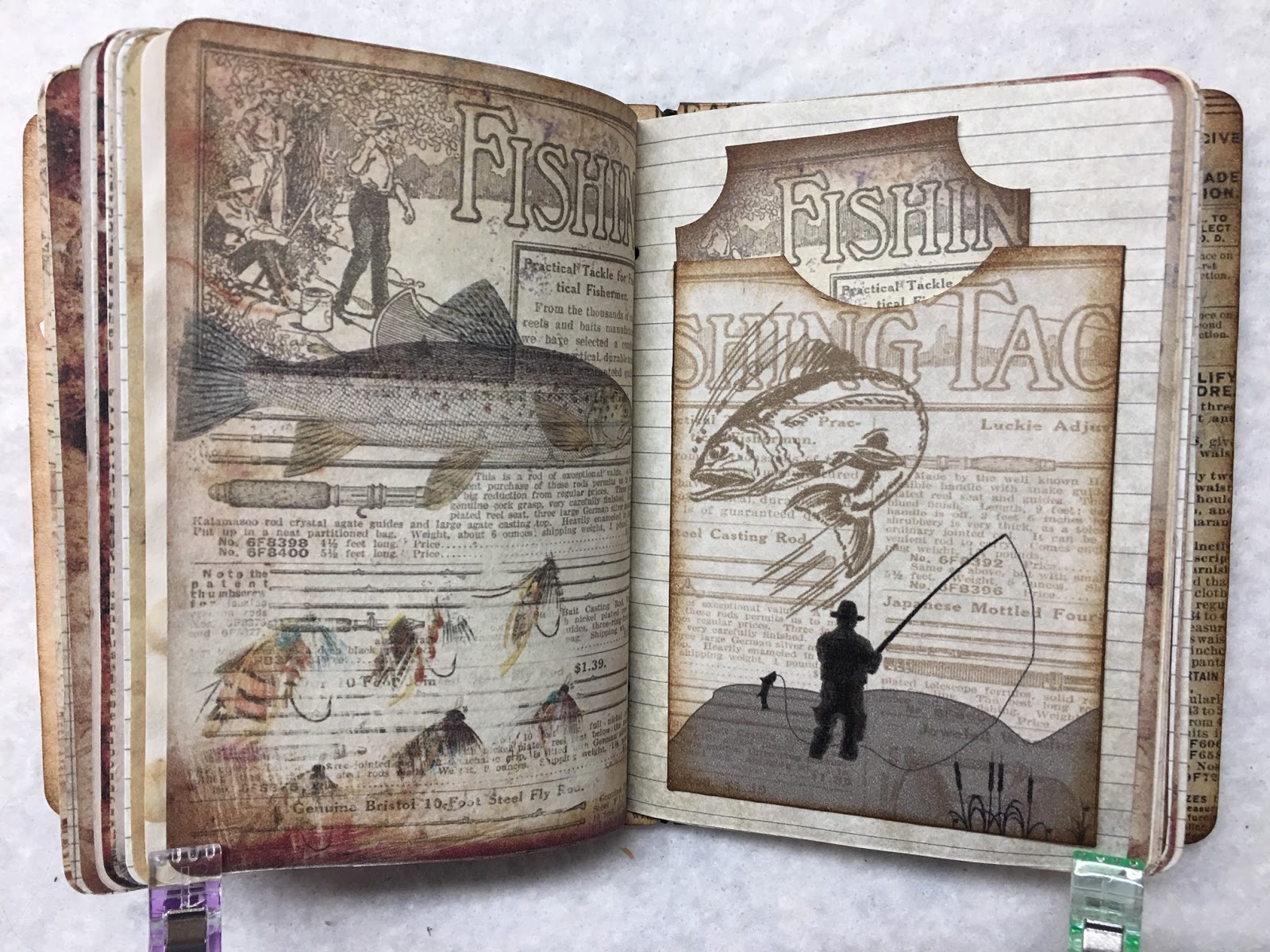
I knew I had to add a background spread dedicated to fishing as my dad was an avid fly fisherman. And who doesn't love the look of vintage automobiles.


I had put together the western spread, but it needed something. I was so happy to find two vintage wanted posters from the 1800s. They were the perfect addition. 


And a couple seafaring / sailing spreads in the kit.


The digital journal kit also includes 5 envelopes, 6 pockets, 10 tags, and 2 bonus printables.


Thanks for visiting my blog.


NOTE: As an Amazon Associate, I earn from qualifying purchase.

Sunday, August 4, 2019

New Journal: Vintage Sheet Music with Butterflies, Bees, and Birds

Here's a "flip through" of my latest journal. This features one of my newest digital journal kits found in my Etsy shop HERE. Note that the journal kit pages are sized at 10X7 inches, or 5X7 inches when folded into a signature. I resized the pages for the passport-sized journal below.

To add to the vintage feel, I print on Ivory Southworth Parchment paper. It is 32# paper, so it has a nice weight to it. You can find it on Amazon HERE.  NOTE: As an Amazon Associate, I earn from qualifying purchase.

I selected one of the pages to use as the covers.

You'll find a tutorial of how I thread my cording through the spine HERE.


Since I found this very old-fashioned music sheet, I had to add Medieval images so I could use this page in my next Medieval journal. It works with my Medieval journal kit found HERE.


Thanks for visiting.


NOTE: As an Amazon Associate, I earn from qualifying purchase.


Monday, July 29, 2019

Free Printables: Ticket-Shaped Tags

The Graphics Fairy released a lovely wildflower image set today that included some printables with black backgrounds. I used them as inspiration to create my own ticket-shaped tags. They measure approximately 2.5 X 4.5 inches.


To save these printables (on a PC): Click the image to show it full size. Then right click and choose "Save image as...". Save to your computer in a place that you'll remember. Then choose Save.

To print: When you are ready to print, click the saved image. It will usually open in a program that you can use to print it. If not, print using whatever program you use for printing. You can also insert into a word processing program and resize the image before printing.

Thanks for visiting my blog.


Saturday, July 20, 2019

Free Printable: Collaged Background Page

The most recent Graphics Fairy tutorial provided some more advanced techniques for creating digital collages. After doing the tutorial, I ventured out and made my own.

This is 10.5 inches wide by about 7.5 inches tall when printed. Of course, you can resize it as needed.


To save these printables (on a PC): Click the image to show it full size. Then right click and choose "Save image as...". Save to your computer in a place that you'll remember. Then choose Save.

To print: When you are ready to print, click the saved image. It will usually open in a program that you can use to print it. If not, print using whatever program you use for printing. You can also insert into a word processing program and resize the image before printing.

Thanks for visiting my blog.


Friday, July 12, 2019

Free Printables: Birds, Bees, Bugs, and Wreaths

Back on a nature theme. A few 3X2 inch journaling cards.


To save these printables (on a PC): Click the image to show it full size. Then right click and choose "Save image as...". Save to your computer in a place that you'll remember. Then choose Save.

To print: When you are ready to print, click the saved image. It will usually open in a program that you can use to print it. If not, print using whatever program you use for printing. You can also insert into a word processing program and resize the image before printing.

Thanks for visiting my blog.


LinkWithin

Related Posts with Thumbnails